momo-cli: Track your time from the terminal
Good news for terminal lovers! momo-cli is now available — a command-line interface for momo.coach that lets you track your time without leaving your terminal.
Why a CLI?
If you're like us, you spend most of your day in a terminal. Context-switching to a web browser just to start a stopwatch or log your time breaks your flow. With momo-cli, you can:
- Start, pause, and stop your stopwatch
- Log time to projects with descriptions
- View your daily timelogs at a glance
- Manage projects with custom colors
Colored status output
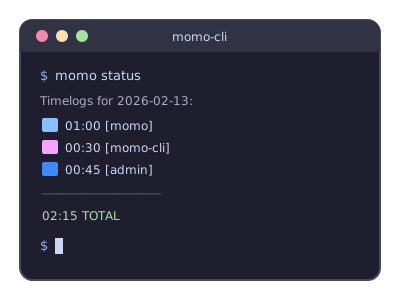
The momo status command now shows your daily timelogs with colored project indicators:
$ momo status
Timelogs for 2026-02-13:
  ██  01:00  [momo]      "API development"
  ██  00:30  [momo-cli]  "CLI improvements"
  ██  00:45  [admin]     "Email setup"
  ─────────────────────────
  02:15  TOTAL
Each project gets its own color, making it easy to scan your day at a glance.
Project management
We've also added a Project CRUD API, which means you can now create and manage projects directly from the command line:
$ momo project list
Projects:
  momo (#89bfffFF)
  momo-cli (#f8a4ffFF) - CLI tool development
  admin (#3e89ffFF)

$ momo project add "Client X" --color #3498db
✓ Created project: Client X
Quick start
Getting started takes about a minute:
$ git clone https://github.com/boris721/momo-cli
$ cd momo-cli && npm link
$ momo auth <your-secret> <your-client-id>
$ momo sw start
▶ Stopwatch started
Get your API credentials from your momo.coach settings.
Zero dependencies
momo-cli uses only Node.js built-in modules — no external dependencies. It's lightweight, fast, and easy to understand. The entire codebase is ~500 lines of JavaScript.
Open source
momo-cli is open source and available on GitHub. Contributions, issues, and feature requests are welcome!
What's next?
We're planning to add more features soon:
- Weekly/monthly reports
- Shell completions (bash, zsh, fish)
- Interactive TUI mode
Got ideas? Open an issue or send a PR!